Skool Alternatives 2026: $9 + 10%, $99, or Free?
· 9 min read
Disclosure: YourSolopreneurKit.com earns commissions from affiliate links at no extra cost to you. Systeme.io is an affiliate partner. Skool, Circle and Mighty Networks are not.
How we tested: We tested Systeme.io's free plan in one hands-on session on October 10, 2026: we created a community and a course and read the plan limits inside the account. We did not run a Skool community. Skool asks for a card before a group can exist, and we stopped at that form. Skool's section comes from its plan-selection and signup screens, which we captured, plus its public pages. Circle and Mighty Networks are described from their public pricing pages, checked the same day.
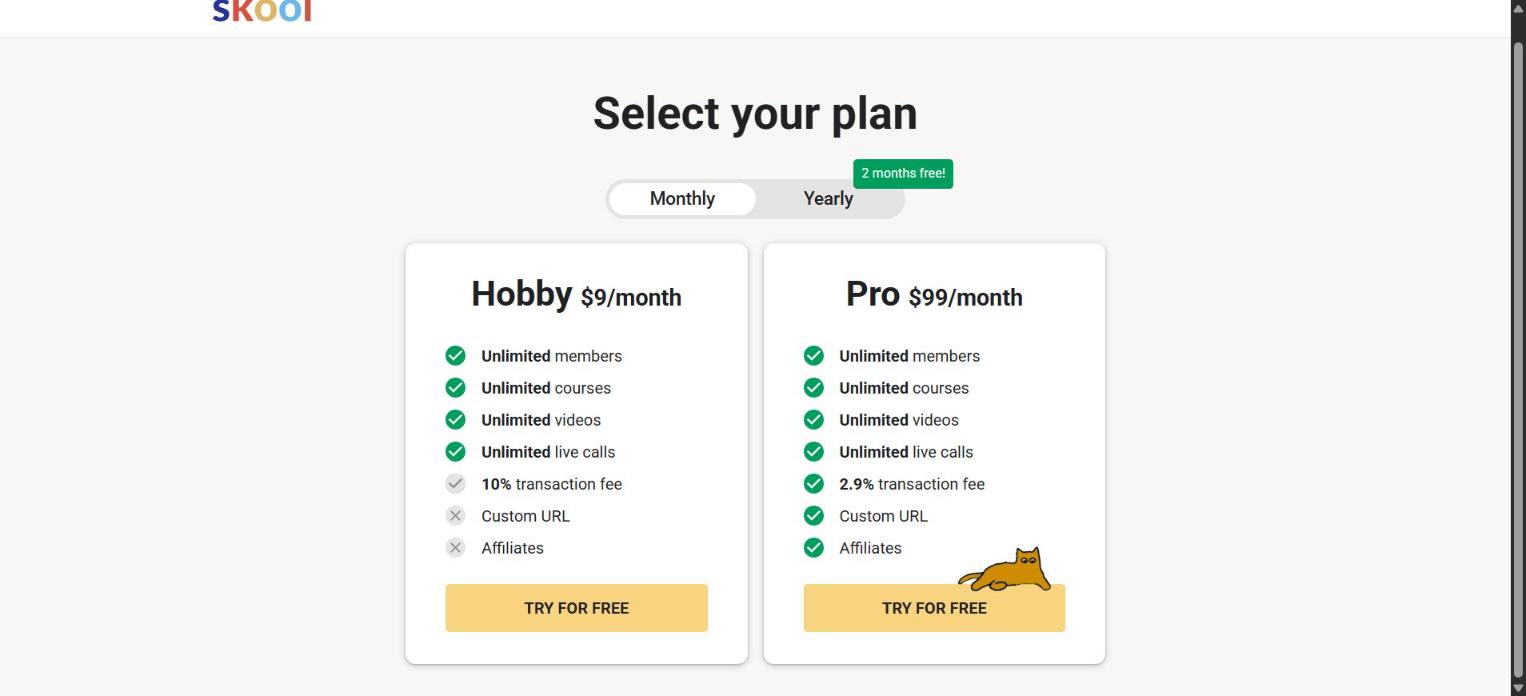
Most articles about Skool alternatives still say Skool costs $99 a month. It has two plans now. When we clicked "Create your community" on October 10, 2026, Skool showed Hobby at $9 a month with a 10% transaction fee, and Pro at $99 a month with a 2.9% fee. So the real question is this: $9 a month plus a tenth of your revenue, or $99 a month, or a free platform. This guide works through all three.
The Short Answer
- A free community with a course and a checkout: Systeme.io. 1 community, 1 course, 0% platform fee on the free plan.
- A structured, branded community and budget for it: Circle, from $89 a month on annual billing.
- A community with its own mobile experience: Mighty Networks, from $79 a month.
- You want Skool's leaderboards and discovery: Skool Hobby at $9 a month is a fair start. Watch the 10%.
Start a community on Systeme.io free →
Skool's Pricing in 2026: What We Saw
Skool's plan screen put two cards side by side. Both list unlimited members, unlimited courses, unlimited videos and unlimited live calls. The differences sit in three lines.

| Skool plan | Monthly price | Transaction fee | Custom URL | Affiliates |
|---|---|---|---|---|
| Hobby | $9 | 10% | No | No |
| Pro | $99 | 2.9% | Yes | Yes |
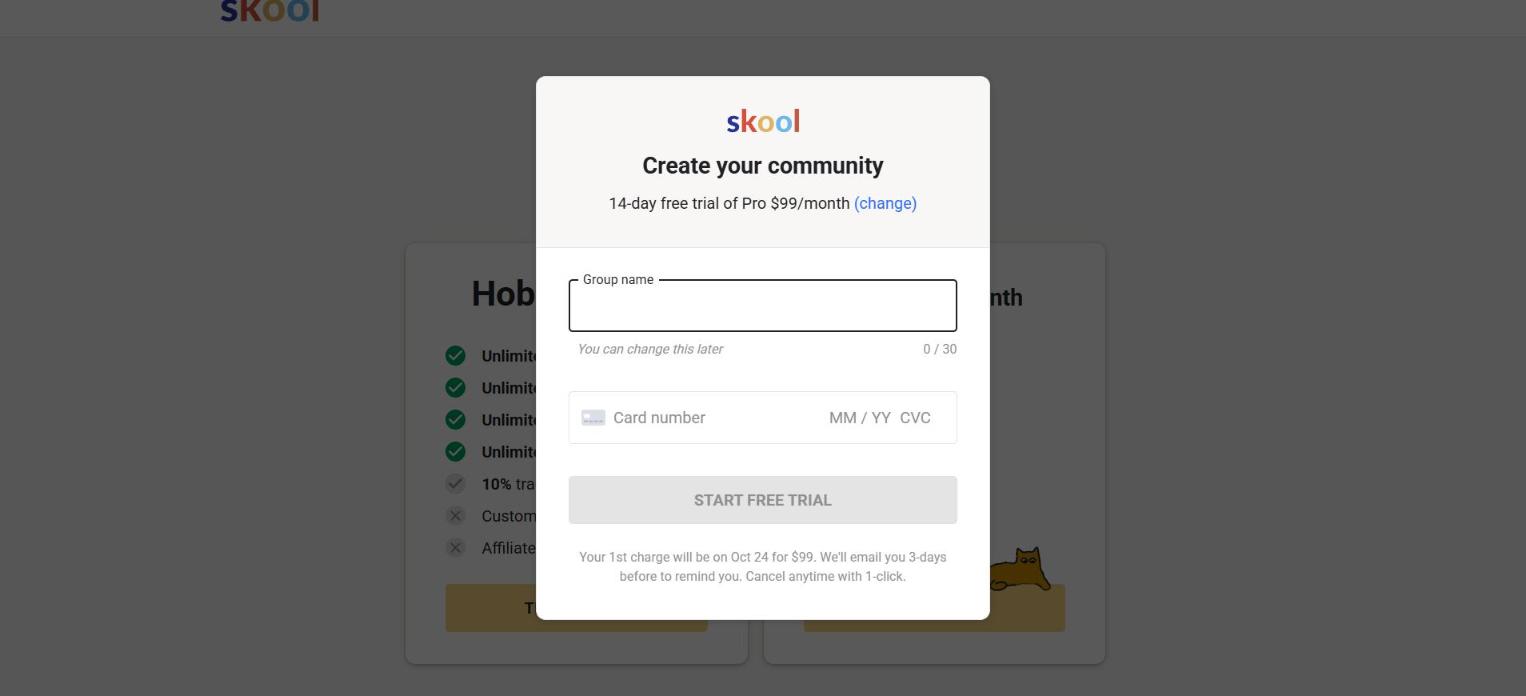
Both buttons say "Try for free". We clicked the Pro one. The next screen asked for a group name and a card number, with this line under the button: "Your 1st charge will be on Oct 24 for $99." That is a 14-day trial with a card on file. We did not enter a card, so we never got inside a Skool group. Everything below about Skool's member experience comes from its public pages, and we say so where it matters.
The Math: $9 Plus 10%, or $99, or Free
The Hobby plan looks cheap until members pay you. The table shows what each option costs per month at four revenue levels, using Skool's listed fees.
| Community revenue per month | Skool Hobby ($9 + 10%) | Skool Pro ($99 + 2.9%) | Systeme.io Free |
|---|---|---|---|
| $0 (free community) | $9 | $99 | $0 |
| $500 | $59 | $113.50 | $0 |
| $1,300 | $139 | $136.70 | $0, or $17 on Startup |
| $3,000 | $309 | $186 | $17 on Startup |
Hobby and Pro cross at about $1,270 a month in revenue. Below that, Hobby costs less. Above it, Pro does. Systeme.io's public pricing page states no transaction fees, so its column is the subscription alone. Payment processors such as Stripe charge their own card fees on Systeme.io. We could not confirm from Skool's screen whether its listed percentages include card processing.
A free community that charges nothing changes the picture. On Hobby that is $9 a month, $108 a year, which many hosts will pay for Skool's format without a second thought.
Skool Alternatives Compared
| Platform | Free plan | Entry price | Transaction fee | Courses included | Tested hands-on? |
|---|---|---|---|---|---|
| Skool | No, 14-day trial with card | $9/month | 10% Hobby, 2.9% Pro | Yes | Signup screens only |
| Systeme.io | Yes: 1 community, 1 course | $17/month | 0% | Yes | Yes, free plan |
| Circle | No, 14-day trial | $89/month, billed yearly | 2% on Professional | Yes | No, pricing page |
| Mighty Networks | No, 14-day trial without card | $79/month | 2% on Launch | Check plan | No, pricing page |
Want this table on one page? Get the Skool alternatives comparison cheat sheet, with the Hobby vs Pro vs free math at four revenue levels. Free.
No spam. Unsubscribe anytime. Privacy policy.
1. Systeme.io: A Community, a Course and a Checkout at $0
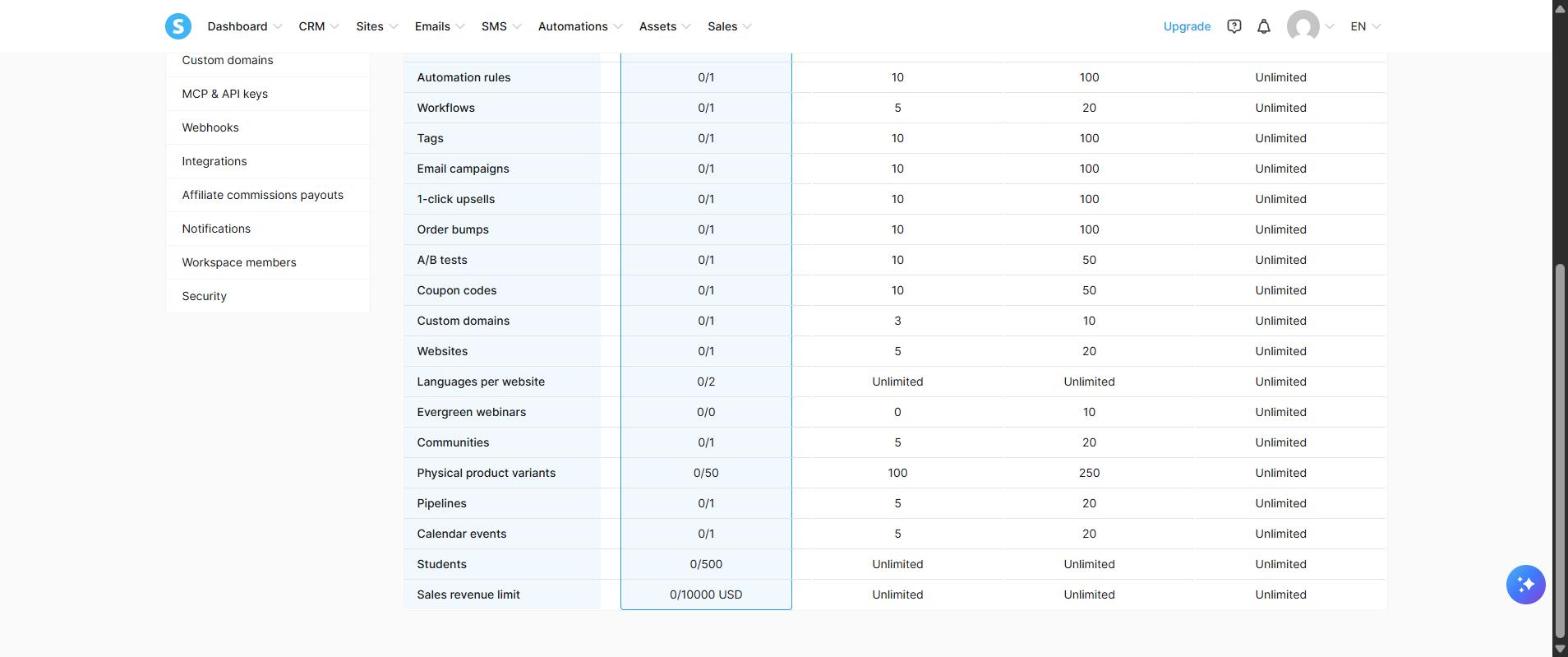
Systeme.io is known for funnels and email. Communities are a newer part of the platform, and they are included on the free plan: the My plan screen in our account listed 1 community, 1 course and 500 students at $0.
What happened when we built one
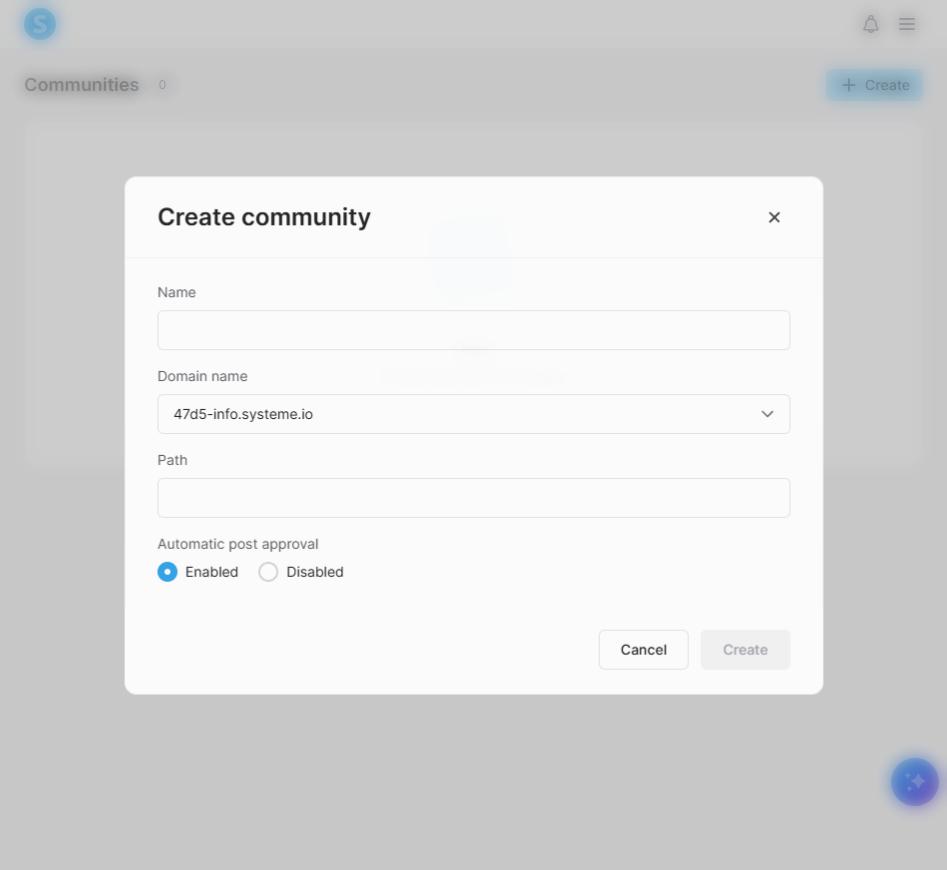
We opened Communities and clicked Create. The form has four fields: name, domain, path, and a choice of automatic post approval on or off. No card, no plan picker.
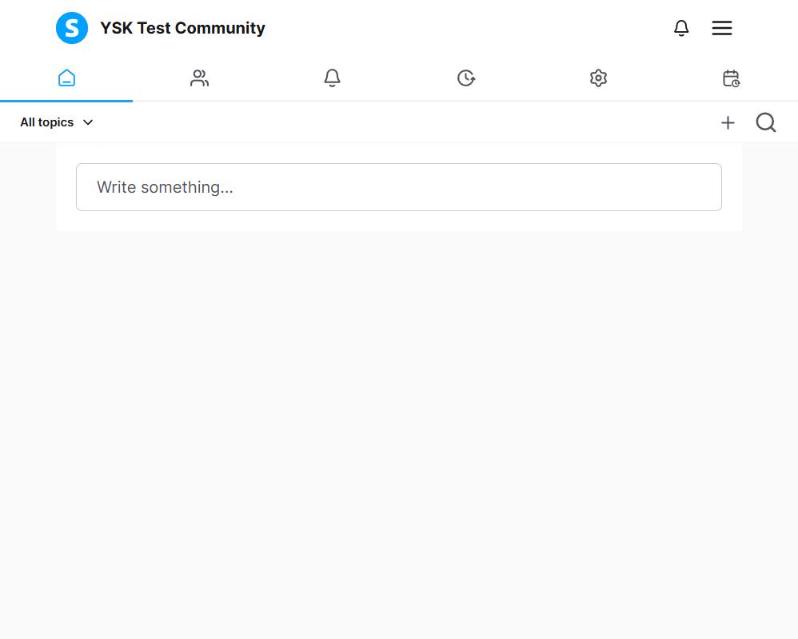
About one minute after the first click, the list showed our community with a home page address. We opened it. The member view has a feed with a "Write something..." box, a topics filter, and a row of icons that includes members, notifications and settings.
One snag: we typed a path, and Systeme.io had already filled one from the name, so our address ended up with the text doubled. Check the path field before you click Create.
We also built a course in the same account in about three minutes: a course, one module, one lesson. Skool's appeal is community and classroom in one place. Systeme.io gives you both pieces, plus the email list and checkout that Skool leaves to other tools.
Where it falls short of Skool
- We saw no leaderboard, points or levels in the community we created. Gamification is the feature Skool hosts talk about most. If your community runs on it, Systeme.io will feel flat.
- No discovery network. Skool's signup page advertises exposure to its user base. A Systeme.io community gets the members you bring.
- Free-plan caps. 1 community, 500 students, and a $10,000 sales revenue limit. The Startup plan at $17 a month lists 5 communities and unlimited students.
- Setup before selling. Systeme.io asked us to connect a payment gateway before it would create a payment page.
Choose Systeme.io if: you want a paid or free community with a course attached and no platform fee, and you can live without gamification. Our Systeme.io review covers the rest of the platform.
Create a free Systeme.io community →
2. Circle: Structure and Branding
Circle organizes a community into spaces: one for announcements, one for each topic, one for each course. It suits memberships where people need to find things. Circle's pricing page lists Professional at $89 a month on annual billing with a 2% transaction fee, Business at $199 with 1%, and courses on every plan. There is a 14-day trial and no free plan.
At $89 a month Circle costs about the same as Skool Pro and gives you more layout control with less game mechanics.
Choose Circle if: you run a paid membership with several content areas and want it to carry your brand.
3. Mighty Networks: Community With an App Focus
Mighty Networks builds communities around a mobile-first experience. Its pricing page lists Launch at $79 a month with a 2% fee, Scale at $179 and Growth at $354. The trial runs 14 days and the page says no credit card is required, which makes it the easiest paid option here to try.
Choose Mighty Networks if: your members live on their phones and you want events and a member directory at the center.
A Note on Free Chat Tools
Many hosts run communities on Discord, Slack or a Facebook group at no cost. Those are chat tools. They have no course area and no checkout, so a paid community needs a second tool for lessons and a third for payments. If your group is free and conversation is the whole product, a chat tool is enough. Once you charge for access or teach in modules, a platform that joins community, course and payment saves you the glue work.
When Skool Is Still the Right Call
Skool does one format well: a feed, a classroom, a calendar and a leaderboard, with nothing to configure. If that format is why your members show up, an alternative has to replace it, and none of the three above copies it.
The $9 Hobby plan also changes the old advice. A hobby group, a free community or a paid one earning under about $1,270 a month costs less on Hobby than on any paid alternative here. Only a free plan beats it. Move to Pro when revenue passes about $1,270 a month.
How to Move a Community
- Export your member list. Skool lets admins export members as a CSV. Confirm the option in your group's settings.
- Save your course content. Download videos and copy lesson text. Communities rarely offer a course export.
- Build the new space first. Create the community, the course and a welcome post before you invite anyone.
- Move paying members last. Subscriptions do not transfer between platforms. Members sign up again on the new one. Offer a discount for the switch and set a clear cutover date.
- Run both for two to four weeks, posting in the old group about the move.
- Cancel the old plan after the cutover date.
We have not migrated a live community. Expect to lose some members in any move, and decide whether the saving covers that loss.
Bottom Line
Skool now starts at $9 a month with a 10% fee, or $99 with 2.9%. Under about $1,270 a month in revenue Hobby is the cheaper Skool plan, and above it Pro is. Systeme.io undercuts both: we built a community and a course on its free plan with no card and no platform fee. You give up Skool's leaderboards and its network. Hosts who need structure and branding should price Circle. Hosts who love Skool's format can stay on Hobby and watch the math.
Related: best online course platforms for solopreneurs and Kajabi alternatives.
Frequently Asked Questions
How much does Skool cost in 2026?
Skool's plan screen showed two plans on October 10, 2026: Hobby at $9 a month with a 10% transaction fee, and Pro at $99 a month with a 2.9% fee. Both start with a 14-day trial that requires a card.
Is there a free alternative to Skool?
Systeme.io's free plan includes 1 community and 1 course for up to 500 students, with no transaction fee and a $10,000 sales revenue limit. We created both without entering a card.
Is Skool Hobby or Pro cheaper?
Hobby costs less until your community earns about $1,270 a month. Above that, Pro's lower 2.9% fee makes it cheaper despite the $99 price.
Does Systeme.io have gamification like Skool?
We saw no leaderboard, points or levels in the community we created on Systeme.io's free plan. If gamification drives your community, Skool fits better.
Did you test Skool?
Only its plan and signup screens. Skool requires a card to start the trial, and we did not enter one. We tested Systeme.io hands-on. Circle and Mighty Networks are described from their pricing pages.
About the Author
The Your SoloPreneur Kit Team — Honest tool reviews, home office guides, and actionable strategies for solopreneurs. Built by a 30-year operations veteran who managed teams across Panama, Central America, and the Caribbean.
Subscribe to The Solopreneur Edge
Get weekly tool reviews, productivity tips, and business strategies delivered to your inbox. Join our growing community of solopreneurs.
Subscribe to Newsletter